
Select your language

Build Joomla pages without writing code
JPiro Page Builder is the visual drag & drop page builder for Joomla. Live frontend editor, over 40 ready-made blocks, responsive design and built-in SEO.
Why JPiro Page Builder
Everything you need, inside Joomla
No external platform: your pages stay on your site, managed with Joomla's own permissions and structure.
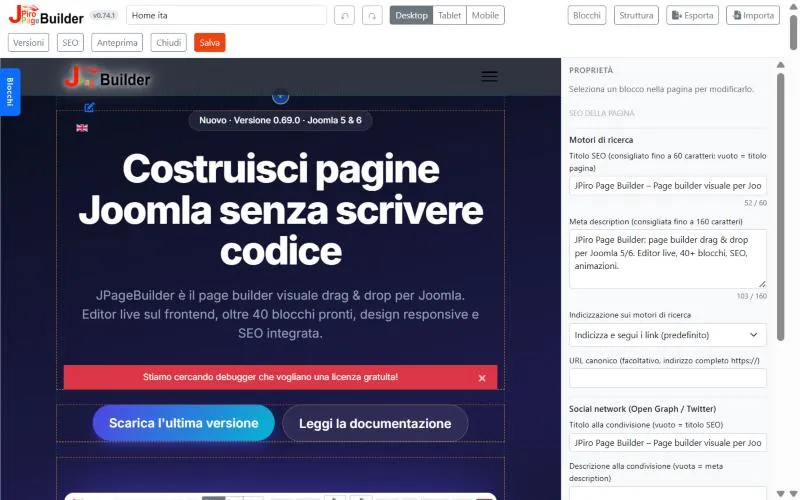
Live editor
Edit right on the frontend and see the result instantly, with your site's own template.
Drag & drop
Draggable sections, rows and columns. Build complex layouts in minutes.
Responsive
Separate desktop, tablet and smartphone settings on every element.
Built-in SEO
Meta title, description, Open Graph and structured data for every page.
Color library
A global palette with transparency, reusable in every block of your site.
Animations
Entrance and scroll effects configured without a single line of CSS.
Backend
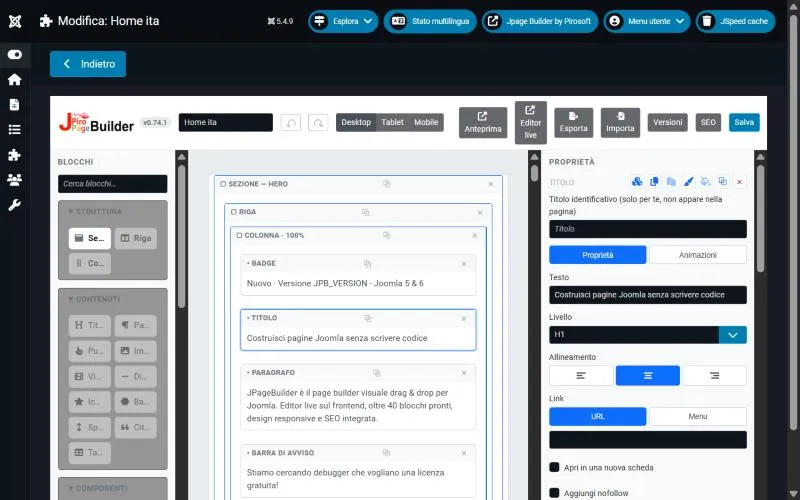
A clear editor, built into Joomla
Manage pages from the administrator like any other content: list, filters, publishing state and access levels.
- Direct link to menu items
- JPiro Page Builder modules in any template position
- Import from other page builders
Frontend
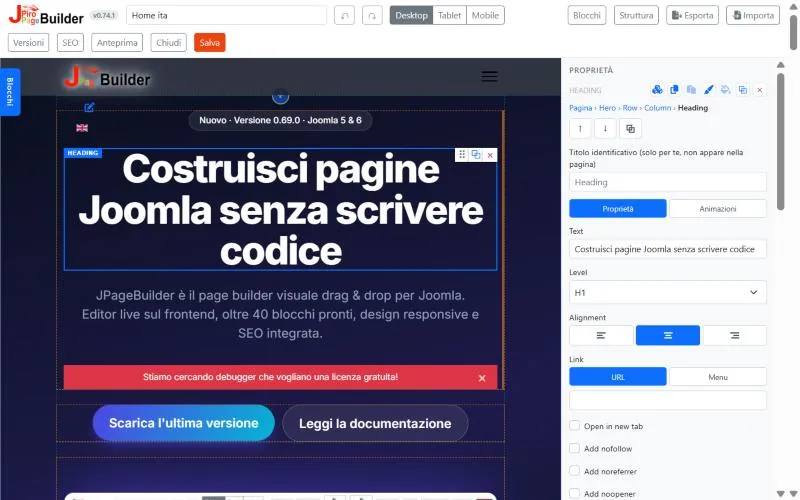
Properties one click away
Select an element and edit its content, style and behaviour from the side panel.
- Typography, spacing, backgrounds and borders
- Per-device visibility
- Instant preview of every change
Addon
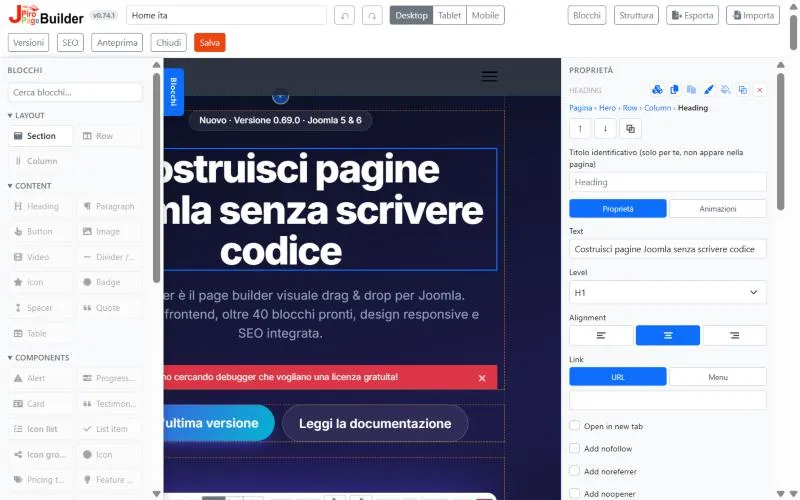
Over 40 ready-to-use blocks
From plain text to galleries, from pricing tables to FAQs: drag the block in and customise it.
Download
Download the latest version
Complete installation package: component, modules and plugins. Install it from System › Install › Extensions.
Documentation
Manuals in English and Italian
A complete user guide and a detailed reference for every block, in PDF format.
User manual
Installation, creating pages, backend and live editors, menu items, modules, global options and SEO.
Addon guide
A sheet for every block with preview, description and all available settings.
Contact
Let's talk on WhatsApp
Fill in the form: the message opens ready to go in WhatsApp, you just press send. We reply the same day.
WhatsApp (app or Web) will open with the message already filled in.
FAQ
Frequently asked questions
Answers to the most common questions about JPage Builder.
What is JPiro Page Builder?
It is a Joomla component that lets you build your site pages visually: pick the blocks, drag them where you want them and see the result right away. You work in the live editor, straight on the real page with your site template, or in the backend editor.
What are the requirements?
Do I need to know how to code?
No. You get more than 40 ready blocks: headings, text, images, galleries, carousels, tabs, accordions, pricing tables, maps, counters, WhatsApp contact forms and much more. Colours, spacing, typography and animations are set in the properties panel, also with different values for desktop, tablet and mobile. If you know code, you can still add classes and CSS.
Does it work with my template?
Yes, with any template based on Bootstrap 5, such as Cassiopeia. Rows and columns work even when the template does not include the Bootstrap grid. Every section can be boxed, fluid or a custom width, and its background can run from edge to edge of the window even in a boxed template.
How do I publish a page on my site?
Create a menu item of type JPage Builder > Page and choose the page: the component handles SEF URLs. You can also show a page or a saved module in a template position with the mod_jppagebuilder module.
Are the pages search-engine friendly?
Yes. Every page has an SEO title, meta description, canonical URL, indexing settings, social preview (Open Graph and Twitter) and structured data. An accordion can output FAQ data for Google, as on this page. Font Awesome icons load only when the page uses them, for lighter pages.
Can I reuse content?
Yes. A row or a section can be saved as a reusable module and placed in several pages: edit it once and it changes everywhere. You can copy and paste a block between pages, duplicate whole pages and export them as JSON to import them into another site.
If I make a mistake, can I go back?
Yes. Undo and Redo (Ctrl+Z, Ctrl+Y) work while you edit. Every save also stores a version of the page, which you can restore at any time. The number of versions kept is set in the Options.
How does the licence work?
The standard licence key is for one site and does not expire. Activate it from Components > JPiro Page Builder > License: it is checked online only once, then the check runs on your site. Without a valid licence the editor does not open, but the pages already published stay visible to your visitors.
How do I update JPiro Page Builder?
Install the package of the new version from System > Install > Extensions, over the existing one: pages, modules, versions and settings stay in place. The installed version shows in the editor bar and at the top of the page list; the release history is published on the site.
Why JPiro Page Builder
10 reasons to choose JPiro Page Builder
A page builder for Joomla that is light, modern and made for people who build sites every day.